
Change Themes in Live Messenger:
To change themes in Messenger, click on the tools menu and select “Change your theme”. You can also access themes by clicking your name on the top right corner and select Personalize Messenger-> Change your theme.
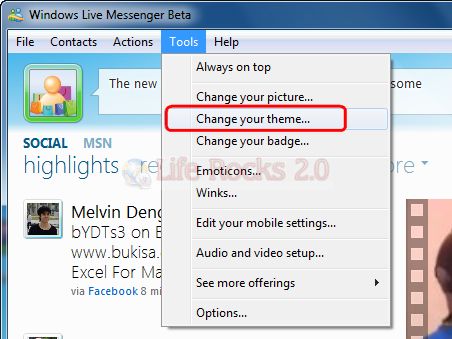
This will open up the themes window where you have lots of preinstalled themes available. You can select any of them and click the Apply button to see the theme in action.
Install new Themes:
To install themes, click on the browse button in the themes window and select the image you want to apply as background. You can use jpg, gif, png and bmp image as background. Once you select the image, messenger will automatically resize the image to suit the size and width.

 Posts
Posts


2 comments:
great help ya
thanksss
Post a Comment